Pretoria & Centurion · Managed IT since 2021
Mon–Fri 07:00–18:00 24/7 emergency line for contract clients

Networks & infrastructure

Business networks in Pretoria & Centurion

Cabling, switching, wifi, firewalls and the line into the building. The layer everything else depends on.

Usually it isn’t the computers

Most small-business networks grow by accident. A switch added under a desk, a second wifi router for the back corner, then a third. Nothing labelled, nothing planned.

A couple of years on the accounting system crawls and calls drop, and the assumption is that the PCs are old. Replacing them is expensive and usually doesn’t help.

We measure first. Where the traffic goes, where it stalls, and at what time of day. Then we tell you what we’d change.

Wifi that drops in half the building. Usually home routers doing a job that needs proper access points on one managed network.

Slow at the same time every day. Usually a backup, a cloud sync or an update rollout scheduled during working hours.

One loose cable takes out half the office. No redundancy, nothing labelled, no diagram of what plugs into what.

Guests and staff on the same network. Visitor devices sitting alongside your client data.

What we design and install

One access point or a whole floor, the approach is the same. Planned, labelled, documented, and the documentation is yours.

Cabling, switching and racks

Cabling terminated into a labelled patch panel. Managed switches sized for what you run, with staff, guests, phones and cameras on separate networks.

  • Cat6 and fibre runs, tested and certified
  • Wall-mount and floor-standing racks, tidied
  • Every port labelled at both ends

Wifi that covers the building

Access points placed from a survey, on one network you can walk across without dropping a call. Guest wifi kept separate.

  • Site survey before anything is bought
  • Seamless roaming across access points
  • Isolated guest network with its own password

Firewalls and remote access

FortiGate firewalls with a documented rule set, and remote access over a VPN rather than an open port. We distribute FortiGate, so the hardware comes through at cost.

  • Firewall policy written down and reviewed
  • Site-to-site and staff VPN
  • Nothing exposed that doesn’t need to be

Connectivity and failover

Fibre as the main line, with a second path that takes over automatically. Usually cheaper than people expect.

  • We pick the ISP and manage the installation
  • Automatic LTE or second-line failover
  • We deal with the provider when it breaks
Network patch panel with cabling
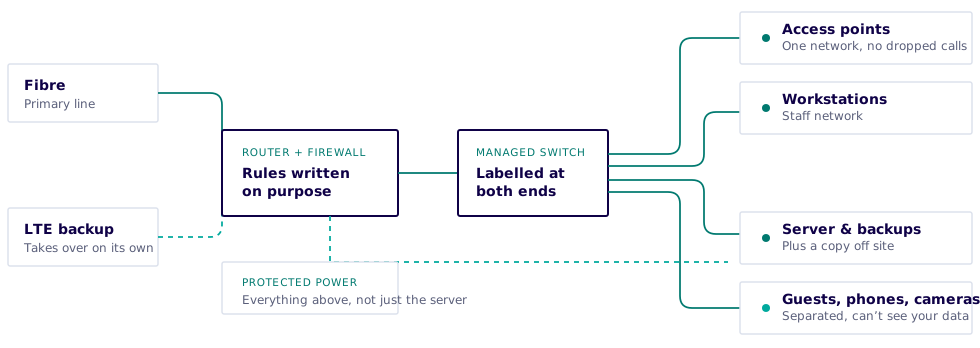
Diagram: fibre and an LTE backup feed a router and firewall, which feeds a managed switch. The switch separates staff, guests, phones and cameras, and connects the access points, workstations and server. Everything in the chain is on protected power.
How we lay a network out. Note the bottom row: protected power across the whole chain, not only the server.

Power

Load-shedding is a network problem, not a server problem

Most offices have a UPS on the server and nothing else. When the power goes, the fibre box, the switches and the access points go with it. The server stays up but nobody can reach it.

We plan the whole chain rather than one box. What has to stay up, for how long, and what that costs. The network kit draws very little, so it’s usually cheaper than expected.

Fibre box, router, switches and access points on protected power, not just the server

Runtime sized against your actual load-shedding schedule

LTE failover for when the line goes down with the power

Equipment set to shut down cleanly rather than drop out mid-write

Office moves and fit-outs

Fibre installation in Gauteng takes four to eight weeks. Ordered late, you can be on mobile data for the first month in a new building.

If you’re choosing between buildings, we can tell you what each one will cost in cabling and connectivity before you commit.

8 WEEKS OUT

Check the building

What fibre is already in the building, who serves it, and what the landlord permits.

6 WEEKS OUT

Order the line

Ordered early, chased weekly by us, with a failover option in case of delays.

3 WEEKS OUT

Cable the empty space

Cheaper and tidier before the desks go in. Points planned around the floor layout.

MOVE WEEKEND

Switch over

Kit moved, rack rebuilt and everything tested over the weekend.

Documentation you own

A diagram of what connects to what, an address plan, a labelled patch schedule, the firewall rules and what each is for, and the credentials handed into your own password manager. It lives with you, not with us.

If you ever replace us, the next supplier gets a folder and can pick it up from there.

  • Network diagram
  • IP address plan
  • Patch schedule
  • Firewall rule set
  • Device inventory
  • Credential handover

What it costs

Projects

Quoted upfront

Cabling, fit-outs and installations are surveyed and quoted before anything is ordered. Hardware at cost, labour itemised.

Ad-hoc

R950/ hour, from

Fault-finding, changes and one-off work, remote or on site. No commitment. Weekdays, 07:00 to 18:00.

Managed

R2 500/ month, from

Monitoring, firmware, configuration backups and a 24/7 emergency line. Scoped to your environment.

Network trouble, or planning one?

Give us a call. Ten minutes will usually tell us whether it’s a quick fix or a project.

Mon–Fri 07:00–18:00 · 24/7 for contract clients

Call now WhatsApp